
Retire the binder behind the info booth.
Lost & found, made for Renaissance Faires.
Lost at Faire gives your team a simple way to log found items, manage lost-item reports, find matches, and get belongings back to their owners.
No spreadsheets. No shoebox full of mystery items. No guessing which volunteer wrote down what.
Built for the way Renaissance Faires actually work.
The shoebox of lost things.
A phone. A pair of glasses. A child’s jacket. A wallet. A handmade pouch that somebody absolutely needs to get back.
By the end of a busy faire day, the Lost & Found booth can become a collection of things, notes, phone numbers, and half-remembered conversations.
And when someone comes back asking,
“Has anyone turned in a blue leather pouch?”
you shouldn’t have to start digging through a box.
The shoebox
- Shoeboxes
- Paper notes
- A binder
- Phone messages
- Uncertainty
Lost at Faire keeps every item accounted for.
Every found item gets a record, a photo, a location, and a status, so your team can find the information they need without hunting through paper.
From found to returned.
Lost & Found doesn’t have to be complicated.
Log it
A volunteer finds something. They take a photo, add a few details, and record where the item is being held.
Done in seconds.
Someone reports it lost
A patron tells you what they’re missing, when they were at the faire, and how to reach them.
Find the match
Search your records using the details that matter. Lost at Faire also suggests likely matches when you log an item or take a report, and your staff decide.
Return it
Once you’ve confirmed the match, mark the item returned and keep the record of what happened.
Log → Report → Match → Return
Built for how your faire actually runs.
Lost at Faire isn’t generic lost-and-found software with a Renaissance Faire theme.
It was designed around the realities of running a faire.
Multiple weekends
Keep items, reports, and activity organized throughout the season.
Rotating volunteers
Give volunteers a system that’s easy to understand without a training manual.
Bins and holding locations
Know where an item is instead of remembering which box you put it in.
Your categories
Phones, wallets, costumes, jewelry, props, water bottles, children’s items, or whatever your faire sees most often.
Busy information booths
Log an item quickly and get back to helping your guests.
End-of-season cleanup
Set how long each kind of item is held, see what’s due to go, and record what happened to every item nobody claimed.
Made for faire Wi‑Fi.
Faire grounds rarely have strong Wi‑Fi. Lost at Faire doesn’t have an offline mode: saving a found item or a report needs a connection at that moment. Everything else is made to need as little of it as possible.
More about faire Wi‑Fi- Pages are light, and work over a phone signal.
- Each faire’s categories and storage locations load once a shift and stay on the tablet, so moving between screens and starting the next item doesn’t wait on the connection.
- Photos are shrunk on the tablet before they’re sent.
- If a save fails because the connection dropped, everything entered stays on the screen to try again.
Patrons can report at the booth. A faire can also put a lost-item form on its own website, linked or embedded, and every report lands in the same list as the booth’s.
Simple enough for a volunteer.
Your Lost & Found team shouldn’t need to be a team of database administrators.
A volunteer should be able to walk up to the desk, find the item they’re looking for, and understand what to do next.
Find an item.
Search by description, category, date found, the weekend’s holding bin, where it’s kept, or other details.
See the important information.
Photo, notes, where it’s stored, when it was found, and what happened to it.
Keep the next volunteer informed.
The information doesn’t disappear when someone’s shift ends.
Because the faire changes volunteers. Your records shouldn’t.
Lost doesn’t mean public.
Your Lost & Found records may contain sensitive information. IDs. Credit cards. Phones. Wallets. Personal belongings.
Lost at Faire keeps your inventory where it belongs, with your staff.
Public side
Report a lost item
Patrons describe what they lost, at the booth or through the faire’s own online form where it has one.
Staff side
Private Lost & Found inventory
Found items, photos, and matching stay with your staff.
Patrons report what they lost.
Your team decides what matches.
Found items aren’t simply put on a public gallery for everyone to browse. Your volunteers can use the information they need to reunite an item with its owner while keeping the rest of your Lost & Found operation private.
How long personal details are kept
- The record of every found item and lost report is kept, so your faire has a lasting record of what came in and where it went.
- Patrons’ personal details in them, such as their name, contact details, shipping address, and notes, are removed automatically 180 days after the faire ends.
- A patron can ask for theirs to be removed sooner.
- They’re never shown to other patrons or the public.
How long we keep it, in our privacy policy, andhow to get details deleted.
The gates close. Lost & Found doesn’t.
A patron doesn’t always realize something is missing before they leave the faire. Maybe they notice it that evening. Maybe the next morning. Maybe they don’t realize until they’re already home.
Lost at Faire keeps your records organized after the crowds have gone home, so your team can continue handling reports, finding matches, and returning belongings without relying on someone’s memory, or a pile of notes from the weekend.
If your faire has put its lost-item form on its own website, patrons who notice something missing at home can report it there. Every reporter gets a link to check on their report.
The faire may be over.
The search doesn’t have to be.
Everything your Lost & Found team needs. Right where they need it.
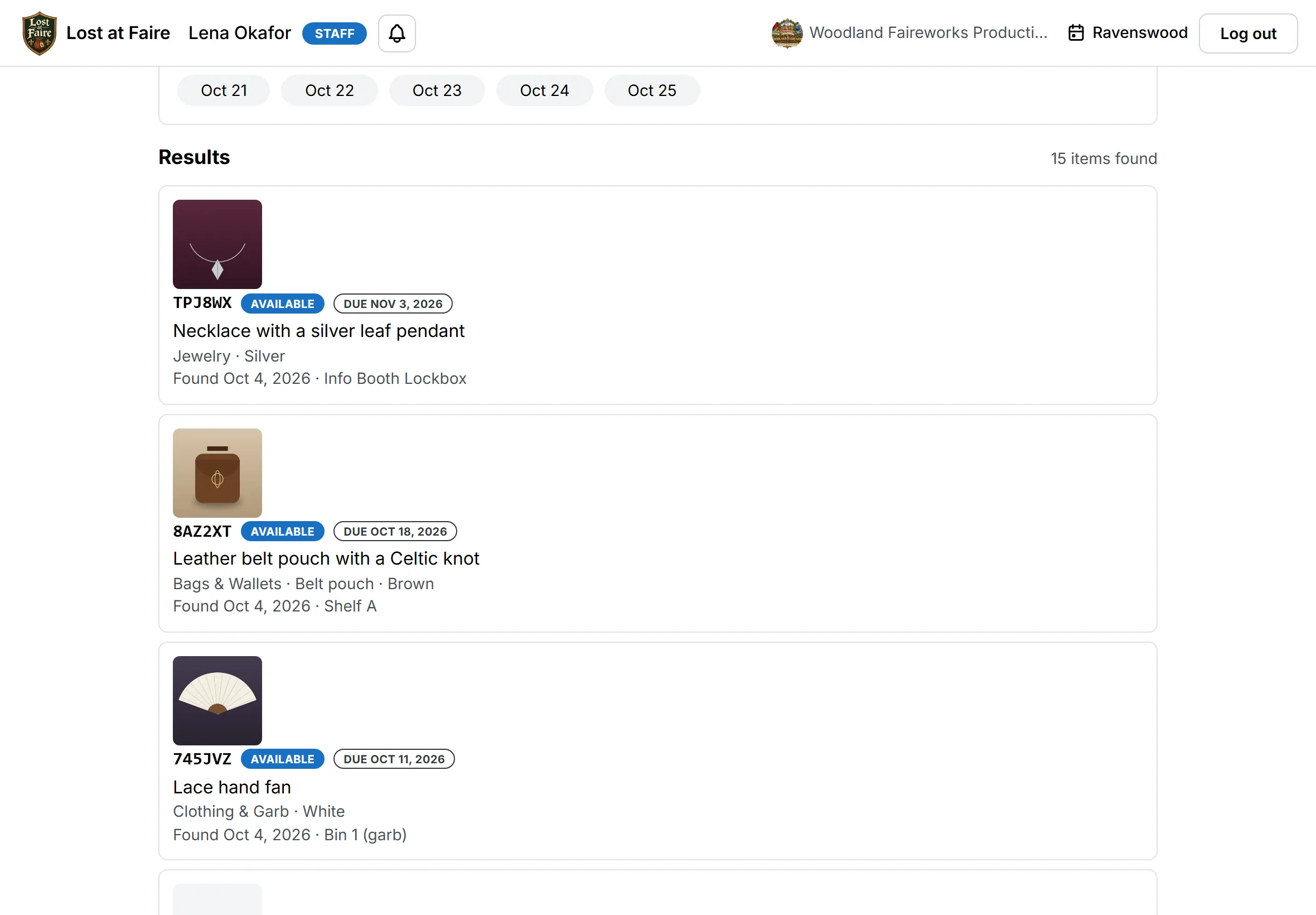
See what was found. Find what was reported. Track where it’s being held. Record what happened next.
Lost at Faire puts the entire story of an item in one place.
Found → Stored → Reported → Matched → Returned
- Open a larger view:
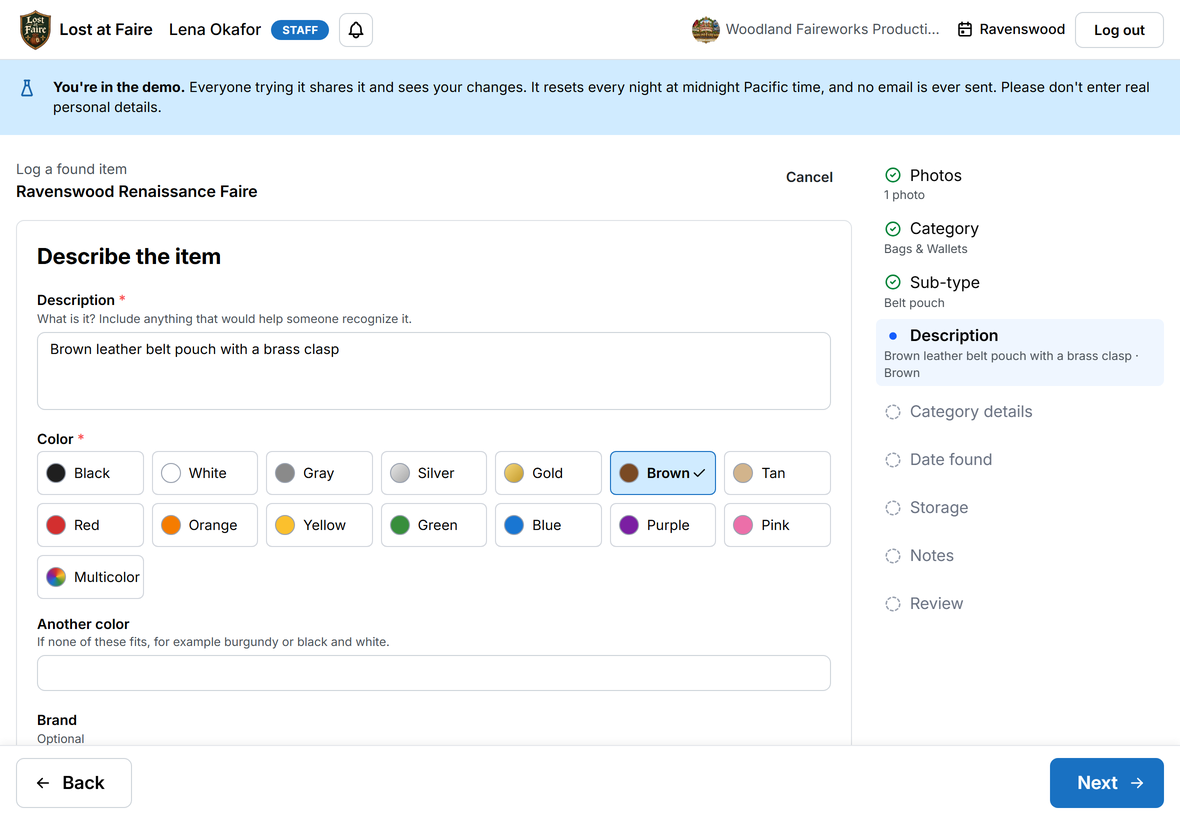
Found item entry
- Open a larger view:
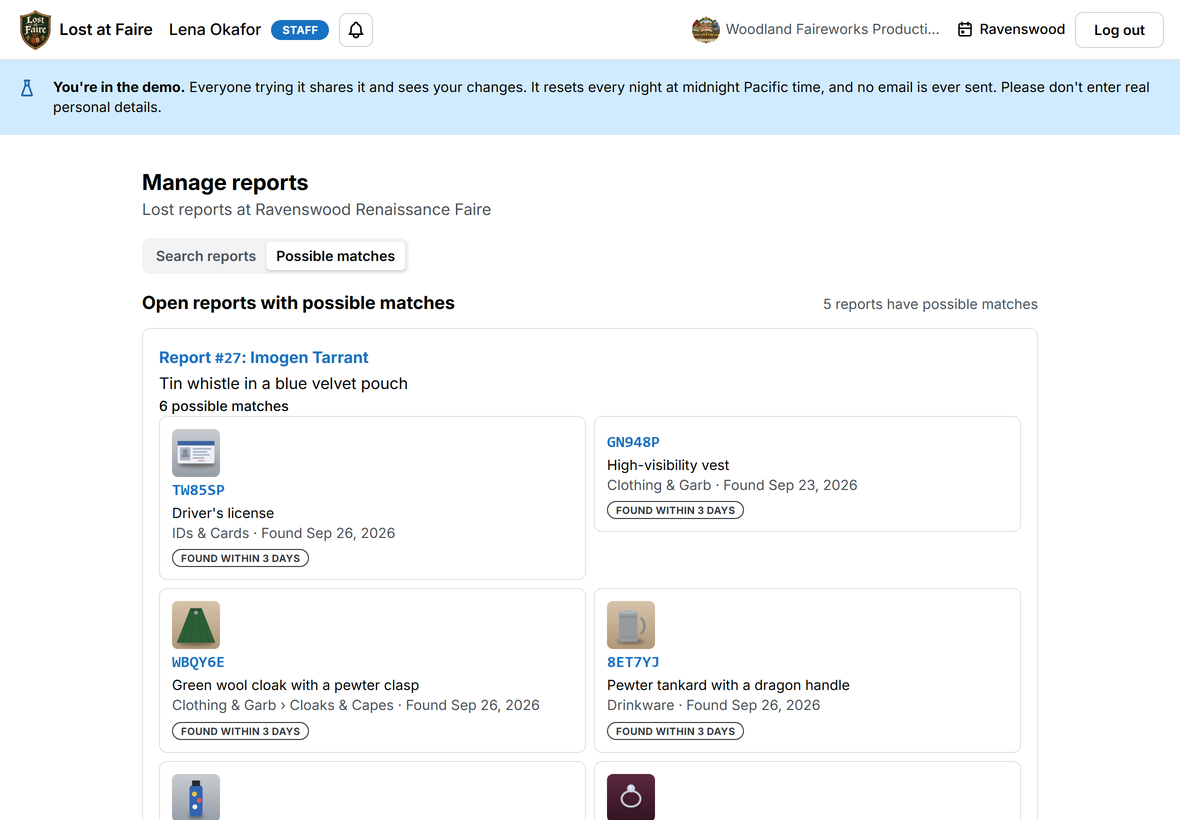
Suggested matches
- Open a larger view:
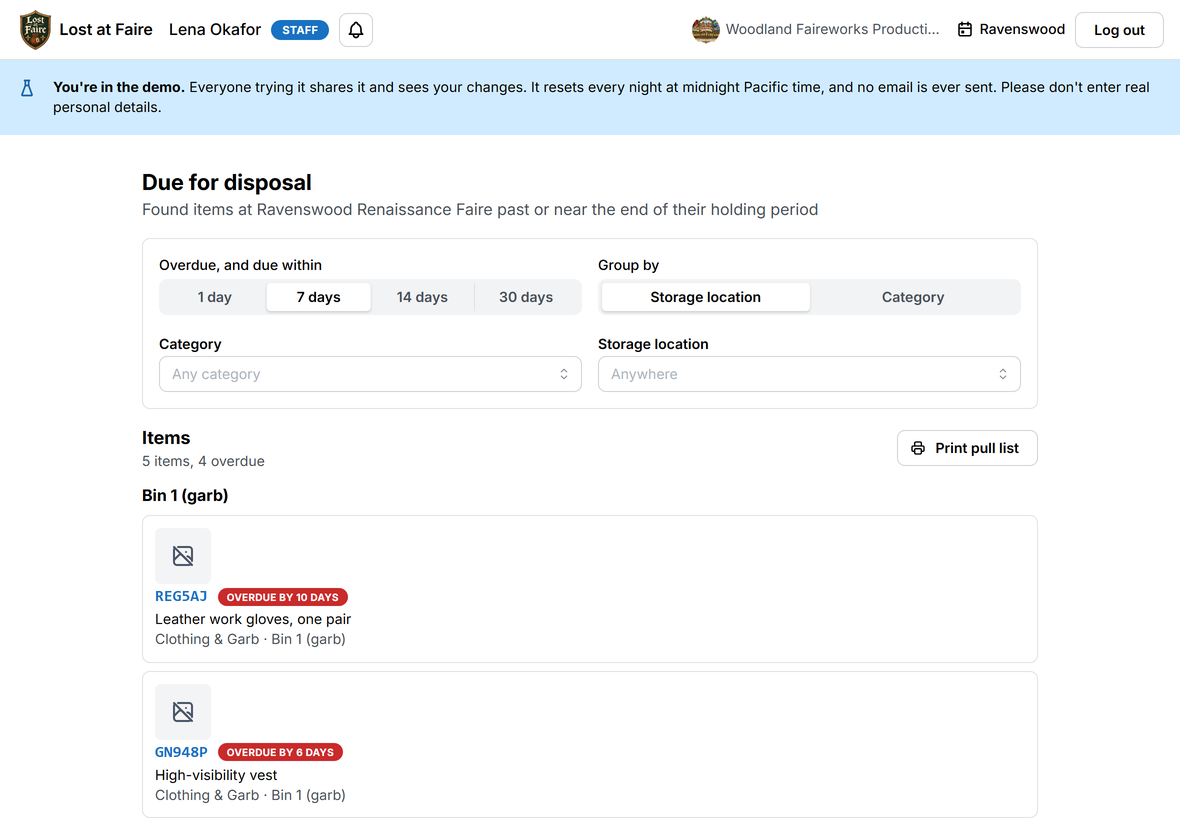
Items due for disposal
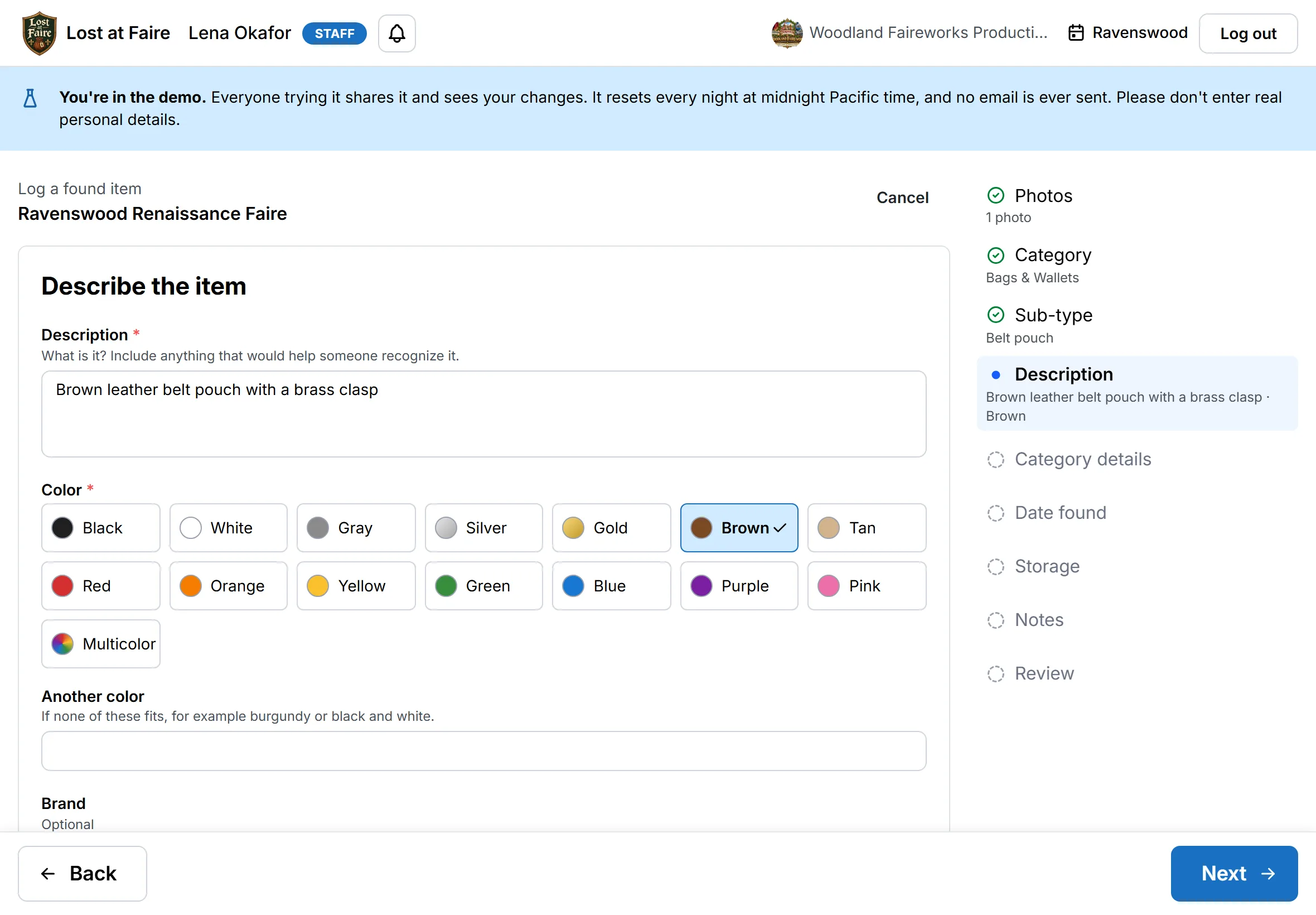
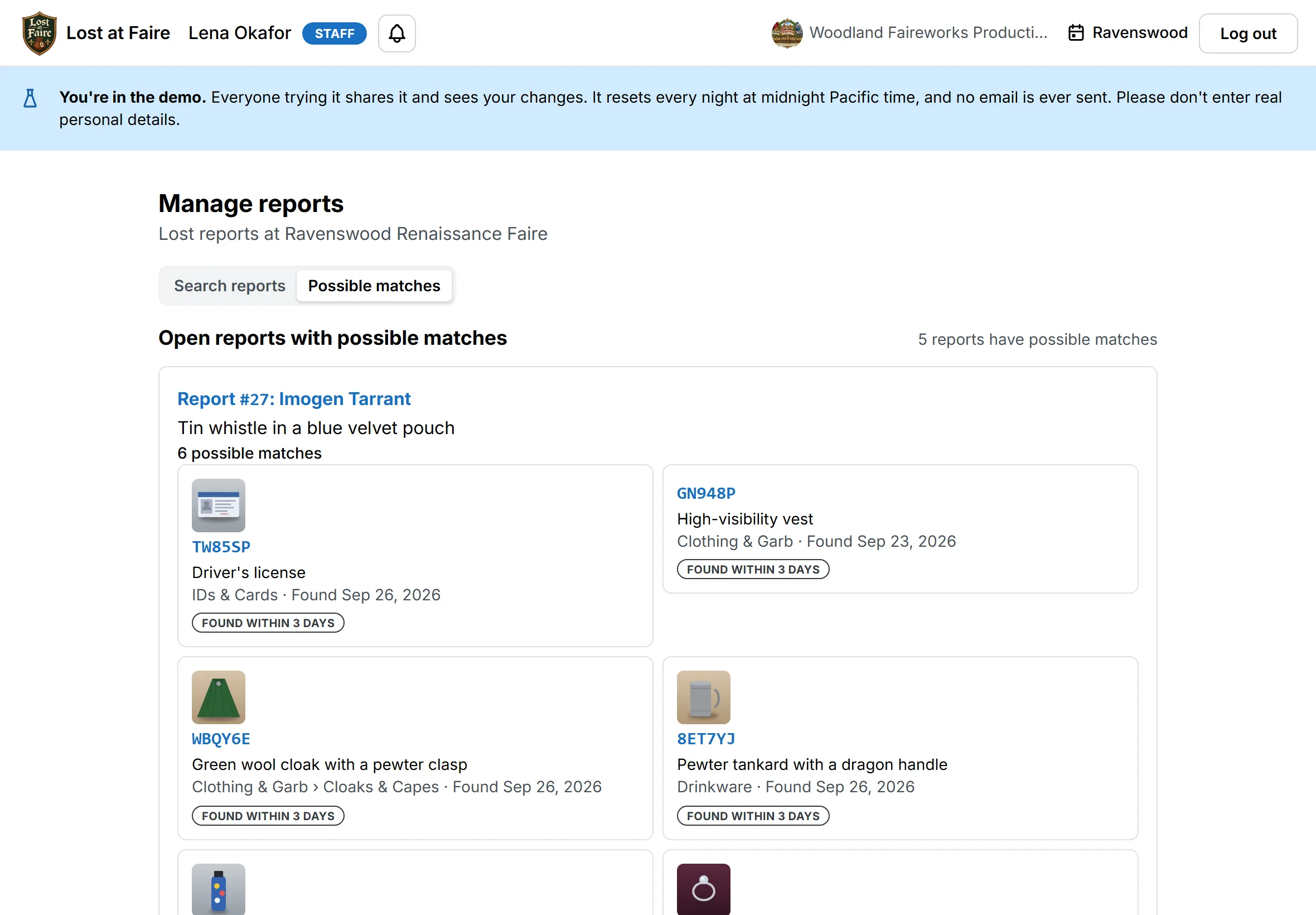
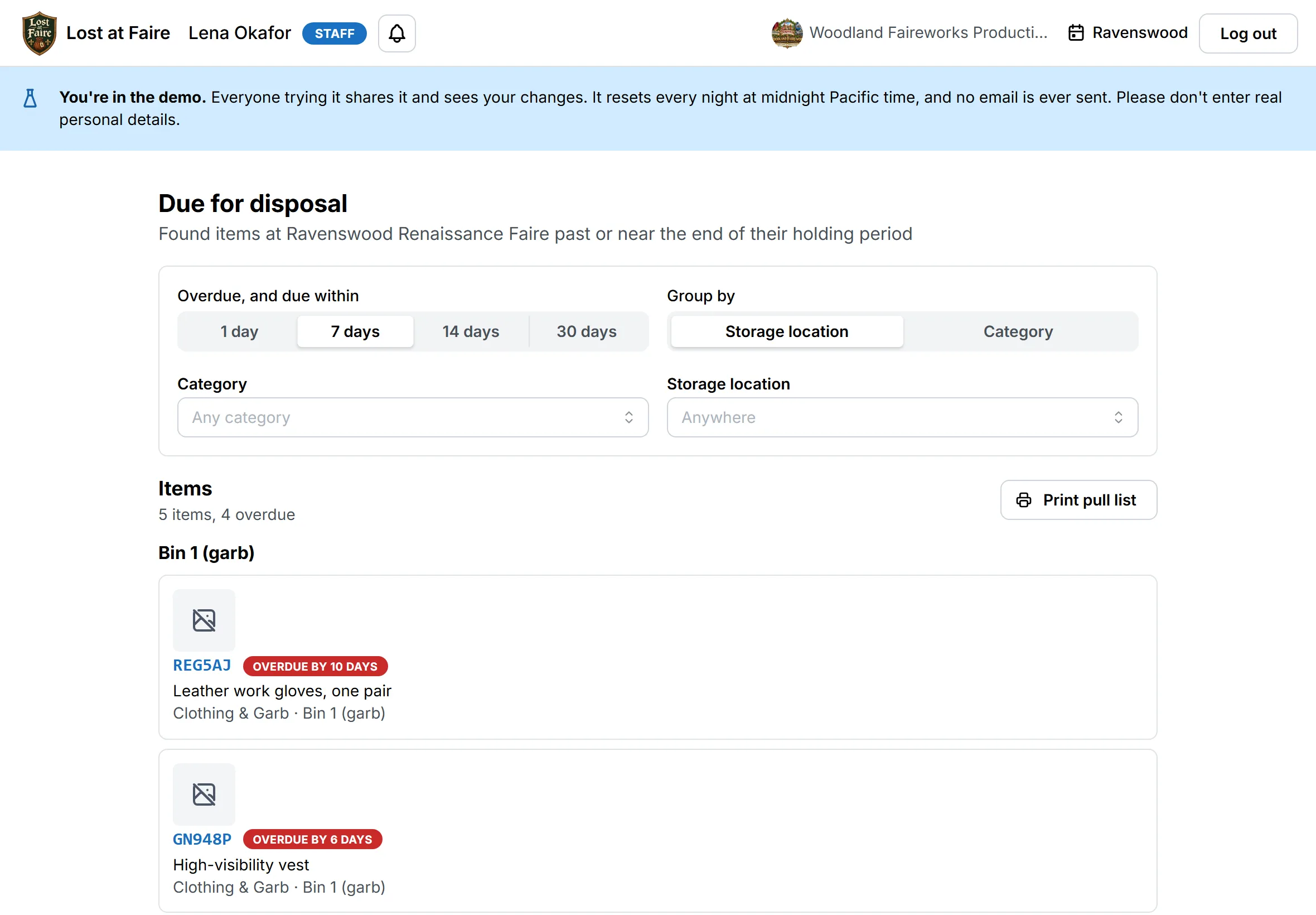
Screens shown use made-up demonstration data.
Made for the people behind the faire.
Faire owners & operators
Keep your Lost & Found process organized across the entire season.
Lost & Found coordinators
Know what’s been found, what’s been reported, what’s waiting for pickup, and what’s already been returned.
Volunteers
Spend less time searching through boxes and more time helping guests.
Your guests
A straightforward way to report something they’ve lost, at the booth or, where your faire offers it, online.
There is a better way.
Before
- A box of found items
- A binder of handwritten notes
- Messages from volunteers
- Lost-item descriptions
- “I think somebody found that…”
- Searching through everything
After
- Every item has a record
- Every item can be identified
- Every item has a location
- Everything is searchable
- Every volunteer sees the same information
- Every return is recorded
Less hunting for lost things.
More returning them.
Built for the people who make Faire happen.
Lost at Faire was created with the unique challenges of Renaissance Faire Lost & Found in mind, from busy information booths and rotating volunteers to multi-weekend seasons and the items your guests leave behind.
As more Faires use Lost at Faire, we’ll share their stories here.
Questions from the realm.
- Can we use it for more than one faire, or a faire that runs several weekends?
- Yes. Each faire is its own event with its own items, reports, and staff, and staff can work at more than one. For multi-weekend faires, storage can be set up by weekend, so you know which weekend’s items are where.
- Who can see patron information?
- Only your staff, and only for the faires they’re assigned to. Patrons never browse the found items, and staff at another faire can’t see yours. See our privacy policy for the details.
- Can we use our own categories?
- Yes. Each faire sets up its own categories, nested as deep as you like, with the details to record for each, such as card type or the name on an ID.
- What happens when an item is returned?
- Staff record the return, and Lost at Faire keeps it on both the item and the report. An admin can undo a return that was made by mistake.
- Can different volunteers use the system?
- Yes. Each staff member or volunteer lead has their own account, assigned to the faires they work at, so the records stay the same when the people change. An admin can change someone’s access at any time, and it takes effect right away.
- What does it take to get started?
- There’s nothing to install. We set up your faire with you: the event and its dates, the kinds of items you take in and the details to record for each, where you store them, and an account for each staff member or volunteer lead. After that, staff sign in from a web browser. A Season includes a setup call with us to go through it together. Read the getting-started guide to see the steps.
Give your Lost & Found booth a better way.
Your volunteers have enough to keep track of. Let Lost at Faire keep track of the lost things.
Less paper. Less searching. Fewer mystery boxes. More things making their way home.
We’ll walk you through how Lost at Faire could work with your faire’s categories, weekends, bins, and workflow. About 30 minutes. No commitment.
Or try the demo yourself, with a made-up faire company.